
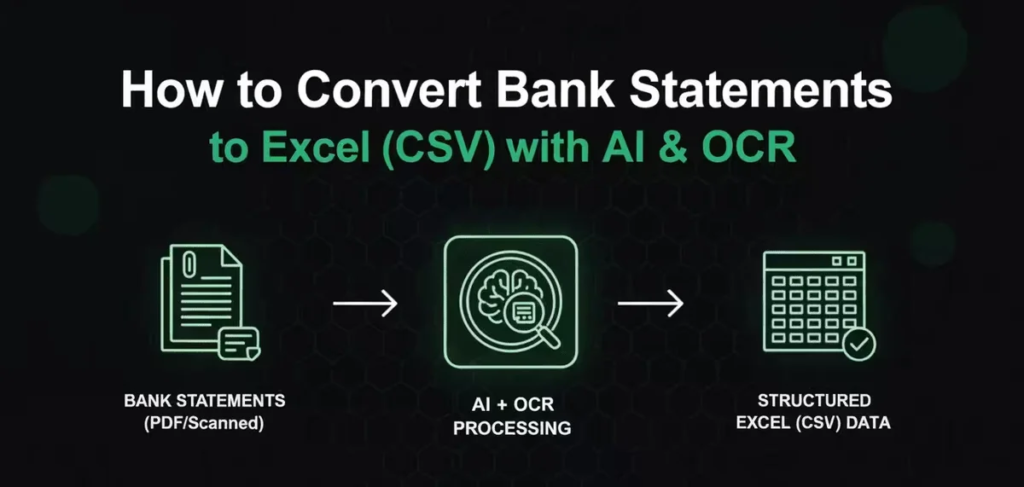
1. Why Exporting Bank Statement Data to CSV Files Matters
Managing financial records has become an essential part of both personal and business accounting. Whether you are a freelancer, small business owner, accountant, or financial analyst, organizing bank transactions efficiently can save countless hours of manual work. One of the fastest and most reliable ways to achieve this is by exporting bank statement data into CSV (Comma-Separated Values) files. CSV files are universally accepted by accounting software, spreadsheet applications, budgeting tools, and financial reporting systems. Instead of manually entering hundreds or even thousands of transactions, users can simply import a CSV file into their preferred software and begin analyzing financial data immediately. This process reduces human error, improves accuracy, and helps maintain organized financial records throughout the year. Many banks offer downloadable statements in PDF format, but PDFs are designed for viewing rather than editing. CSV files, on the other hand, allow users to sort, filter, categorize, and analyze transactions with ease. Businesses can quickly reconcile accounts, generate tax reports, monitor expenses, and prepare financial statements without spending hours copying information line by line. Exporting bank statement data also supports automation, allowing businesses to integrate banking information directly into accounting platforms. As digital banking continues to evolve, CSV exports have become an industry standard for financial management. Understanding the fastest methods for converting or exporting bank statement data into CSV format can dramatically improve productivity while ensuring data remains accurate, accessible, and ready for financial analysis.
2. The Fastest Methods to Export Bank Statement Data into CSV
There are several efficient ways to export bank statement pdf to csv files, depending on the format provided by your financial institution. The simplest option is downloading a CSV statement directly from your online banking portal, as many modern banks offer this feature alongside PDF and Excel downloads. Users simply log into their online account, select the desired account, choose the transaction period, and download the statement in CSV format. However, not every bank provides this option. In those situations, specialized bank statement conversion software becomes the fastest solution. These tools automatically extract transaction details from PDF bank statements and convert them into clean, structured CSV files within seconds. Advanced Optical Character Recognition (OCR) technology can even process scanned statements with impressive accuracy. Some applications support batch processing, allowing users to convert multiple bank statements simultaneously, making them ideal for accountants and bookkeeping firms managing multiple clients. Spreadsheet software such as Microsoft Excel and Google Sheets can also assist with importing structured data, although manual formatting may still be necessary. Financial management platforms often include built-in import tools capable of reading CSV files generated from banks or conversion software. Choosing the right method depends on the statement format, transaction volume, and required level of automation. For individuals handling a few statements each month, manual exports may be sufficient. Businesses processing thousands of transactions, however, benefit greatly from automated conversion solutions that reduce workload while maintaining data consistency and reliability.
3. Benefits of Using CSV Files for Financial Data Management
CSV files have become one of the most widely used formats for financial information because of their simplicity, compatibility, and flexibility. Unlike proprietary file formats that require specific software, CSV files can be opened using nearly any spreadsheet application, database system, or accounting platform. This universal compatibility allows businesses to transfer financial information seamlessly between different software programs without losing important transaction details. Another major advantage is improved data analysis. Users can easily filter transactions by date, amount, merchant, category, or payment type, making it much easier to identify spending trends, unusual transactions, or budgeting opportunities. CSV files also support automation through scripts, APIs, and accounting integrations, enabling repetitive tasks to be completed automatically. For tax preparation, exporting bank statements into CSV format simplifies income tracking, deductible expense identification, and audit preparation. Businesses benefit from faster monthly reconciliations because imported CSV data matches accounting records more efficiently than manually entered information. Financial professionals can also create customized reports, pivot tables, charts, and dashboards that provide valuable insights into cash flow and business performance. Since CSV files contain plain text data, they are lightweight, easy to store, and simple to back up for long-term record keeping. Additionally, organizations can maintain standardized financial records across multiple departments or subsidiaries. By using CSV files as a central data format, companies improve operational efficiency, minimize transcription errors, and create a stronger foundation for informed financial decision-making.
4. Best Practices for Accurate and Secure Bank Statement Exporting
While exporting bank statement data is relatively straightforward, following best practices ensures both accuracy and data security. Before exporting any statement, verify that the selected date range covers the required reporting period. Missing or duplicated transactions can create reconciliation issues later. After downloading or converting the statement into CSV format, review several transactions to confirm that dates, descriptions, balances, and transaction amounts have been transferred correctly. If using PDF conversion software, choose reputable tools that maintain formatting accuracy and support encrypted bank statements whenever possible. Since bank statements contain sensitive financial information, security should remain a top priority throughout the export process. Always use secure internet connections when accessing online banking, avoid public Wi-Fi networks, and store exported CSV files in encrypted folders or secure cloud storage platforms with strong authentication. Regularly update conversion software to benefit from the latest security improvements and compatibility updates. Businesses should establish standardized naming conventions for exported files, making future searches easier while maintaining organized financial archives. Access permissions should also be restricted so that only authorized employees can view or edit sensitive banking information. Keeping backup copies of exported CSV files helps protect against accidental deletion or hardware failure. Finally, periodically compare imported CSV data with original bank statements to verify completeness and maintain confidence in financial reporting. These best practices not only improve operational efficiency but also strengthen financial data integrity and compliance with organizational policies.
5. Choosing the Right Export Solution for Long-Term Efficiency
Selecting the right method for exporting bank statement data to CSV files depends largely on your financial workflow, transaction volume, and software ecosystem. Individuals managing personal finances may only require occasional CSV downloads directly from their online banking platform. Freelancers and small businesses often benefit from conversion software that transforms PDF statements into editable CSV files quickly and accurately. Larger organizations, accounting firms, and financial institutions typically require enterprise-grade solutions capable of processing large batches of statements while integrating seamlessly with accounting systems, enterprise resource planning (ERP) platforms, and bookkeeping software. When evaluating export solutions, consider factors such as conversion accuracy, processing speed, supported bank formats, OCR quality, automation capabilities, security standards, customer support, and software compatibility. Cloud-based platforms may provide convenient access from multiple devices, while desktop applications often offer enhanced privacy by keeping sensitive financial data stored locally. Scalability is another important consideration, especially for growing businesses that expect transaction volumes to increase over time. Investing in a reliable export solution today can significantly reduce administrative costs, eliminate repetitive manual data entry, improve reporting accuracy, and accelerate financial decision-making. As businesses continue embracing digital transformation, efficient bank statement exports have become an essential component of modern accounting workflows. By implementing the fastest and most reliable CSV export methods, organizations and individuals can streamline bookkeeping, improve financial transparency, and gain greater control over their financial information while saving valuable time every month.